Updated
—
2 min read
Cursor TSServer Crash / Hanging Fix
 By Ryan Chiang (@ryanscio)
How to fix Cursor TSServer crashing or hanging: 'TSServer exited. Code: null. Signal: SIGTERM'
Using Cursor (a VSCode fork) in a large Typescript monorepo project, I came across an issue where the tsserver process would crash, hang, or otherwise be excruciatingly slow.
The Output pane in Cursor would show something like this:
2025-12-05 11:18:12.688 [info] <semantic> Starting... 2025-12-05 11:18:12.699 [info] Killing TS Server 2025-12-05 11:18:12.699 [info] Starting TS Server 2025-12-05 11:18:12.699 [info] Using tsserver from: /Applications/Cursor.app/Contents/Resources/app/extensions/node_modules/typescript/lib/tsserver.js 2025-12-05 11:18:12.699 [info] <syntax> Forking... 2025-12-05 11:18:12.699 [info] <syntax> Starting... 2025-12-05 11:18:12.699 [info] <semantic> Forking... 2025-12-05 11:18:12.699 [info] <semantic> Starting... 2025-12-05 11:18:12.703 [error] TSServer exited. Code: null. Signal: SIGTERM
I tried disabling all extensions, upgrading Cursor, clearing the cache, checking for circularity (Type instantiation is excessively deep and possibly infinite.ts(2589) was popping up suddenly), etc.
The solution I overlooked is much simpler: point the tsserver process to your workspace's tsserver.js file.
{ "typescript.tsdk": "node_modules/typescript/lib" }
Or from the Typescript: Select Typescript Version command:
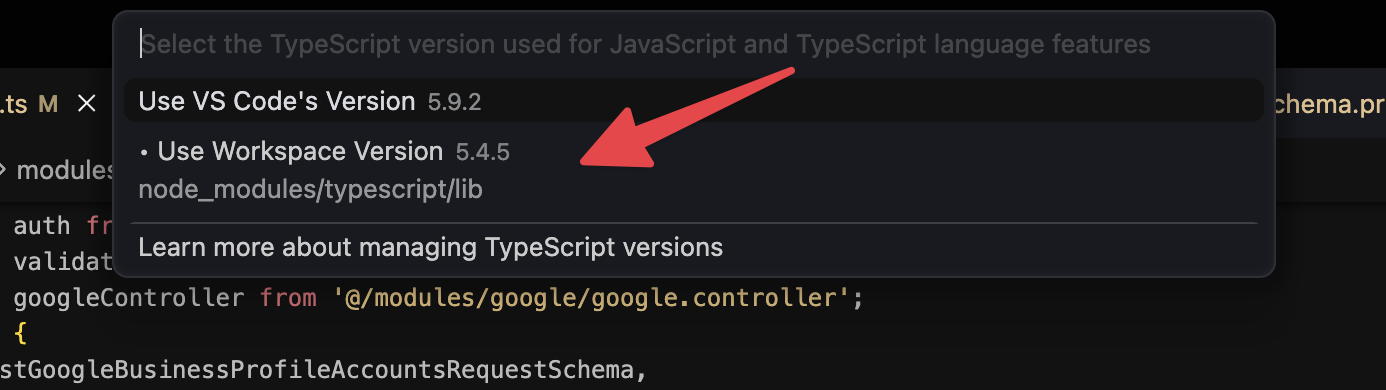
If still encountering issues, then you can try the other steps like Developer: Reload with Extensions Disabled, upgrading cursor, and clearing the cache.
Hope this helps.
Meet the Author
Hey! I'm Ryan. I build things and write about them. This is my blog of my learnings, tutorials, and whatever else I feel like writing about.
What I'm currently building →.